
Dashboard: Overview
The Web App opens on the Locations tab, but many users prefer to click Dashboard for an overview of what's happening in their business. The Dashboard has several components, covered in their own articles: the Company Results Graph, High Level Numbers, Revenue/Profit Pie Charts, and Quick View Lists.
Use this section to get a quick, high-level read on company performance before diving into specific areas.
Dashboard: Company Results Graph
The first thing to catch the eye on the Dashboard is the Company Results Graph. It shows activity for your business since the day you started using Vagabond, with the last 12 months of history visible.
Reading the graph
- Totals vs. Average — Toggle the button in the upper-left corner to switch how results are displayed.
- Legend — The legend at the bottom describes what each line represents: Revenue, Net Revenue, and Units Sold.
Dashboard: High Level Numbers
In the upper-left of the Dashboard, the app displays critical numbers about your company's overall activity. Some may seem confusing at first, so here's a breakdown.
Average Results/Day/Machine
Each number is a daily average of activity across all Locations since your company started using Vagabond. Covered values are:
- Revenue
- Net Revenue
- Price/Vend
- Cost/Vend
- Margin/Vend
Processed to Date
Current Operator shows all Revenue and Transaction totals for your company, followed by the same values for ALL companies using Vagabond Vending (System Wide). These numbers update each time you log in.
Dashboard: Revenue/Profit Pie Charts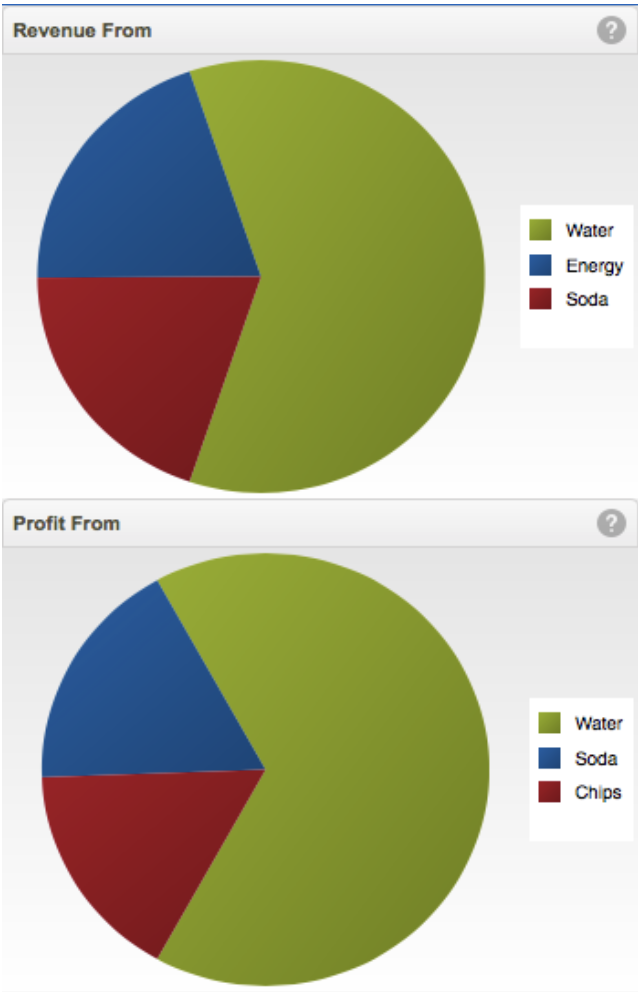
These charts show the top 3 Product Categories in your operation in proportion to each other.
- The top chart displays Revenue.
- The bottom chart displays Profit.
Dashboard: Quick View Lists
At the bottom of the Dashboard, Quick View Lists show key areas of impact in your company, sorted from either highest or lowest value depending on how the toggle at the top is set. Each list shows a description and a dollar value.
[SCREENSHOT: Four Quick View Lists — Selling Locations, Profitable Locations, Selling Products, Profitable Products]
The four lists are:
- Selling Locations
- Profitable Locations
- Selling Products
- Profitable Products
Comments
0 comments